AI Auto-Apply to Jobs — Automatically, Every Day
Set your job preferences once. LoopCV's AI scans LinkedIn, Indeed, and 30+ job boards — and automatically applies to matching roles on your behalf, every day.
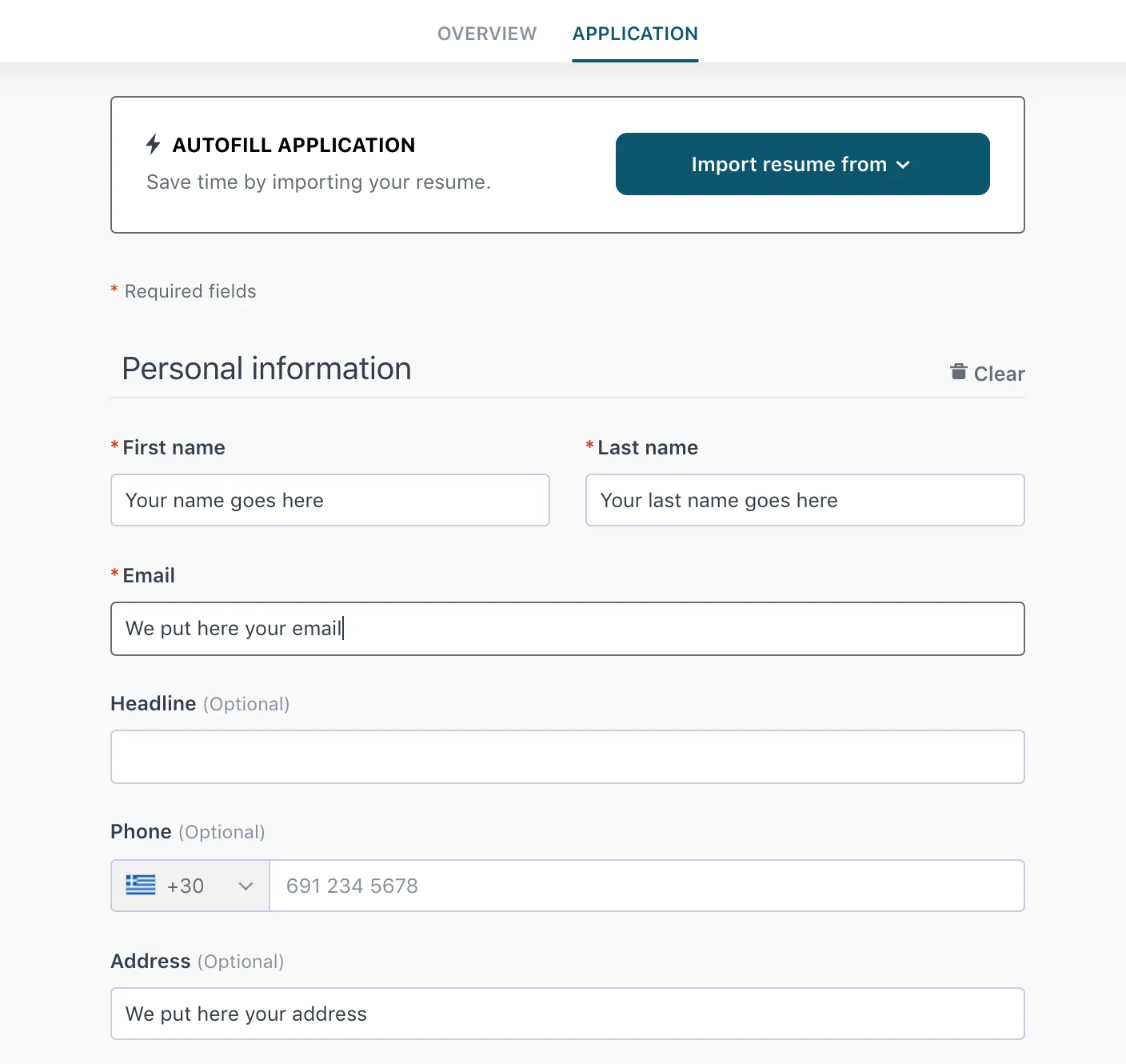
We know how boring and how difficult it is to copy paste information accross different job application forms. That's why we created Loopcv. Loopcv is the first platform that automatically (auto) fills your personal information and upload your resume. So to put it simply, we automatically fill job application forms and we auto-fill job applications with your personal details. In this way, you don't have to open 100 different tabs in order to apply for jobs. You can use one platform for your job search and job application process and Loopcv does the rest!
We upload your CV and we click the submit button (yes we automate the job applications)
Looking for an Automatic Job applier to auto-fill job application forms?
The first end to end job search automation platform
- Match with hundreds of jobs
- Auto-apply to jobs with AI
- Find statistics and get improved
Automate Job Applications like never before with a powerful platform (like a super job application bot)
Loopcv types your personal details, uploads your CV and automates the job application process on your behalf using AI
Check how our auto apply bot works
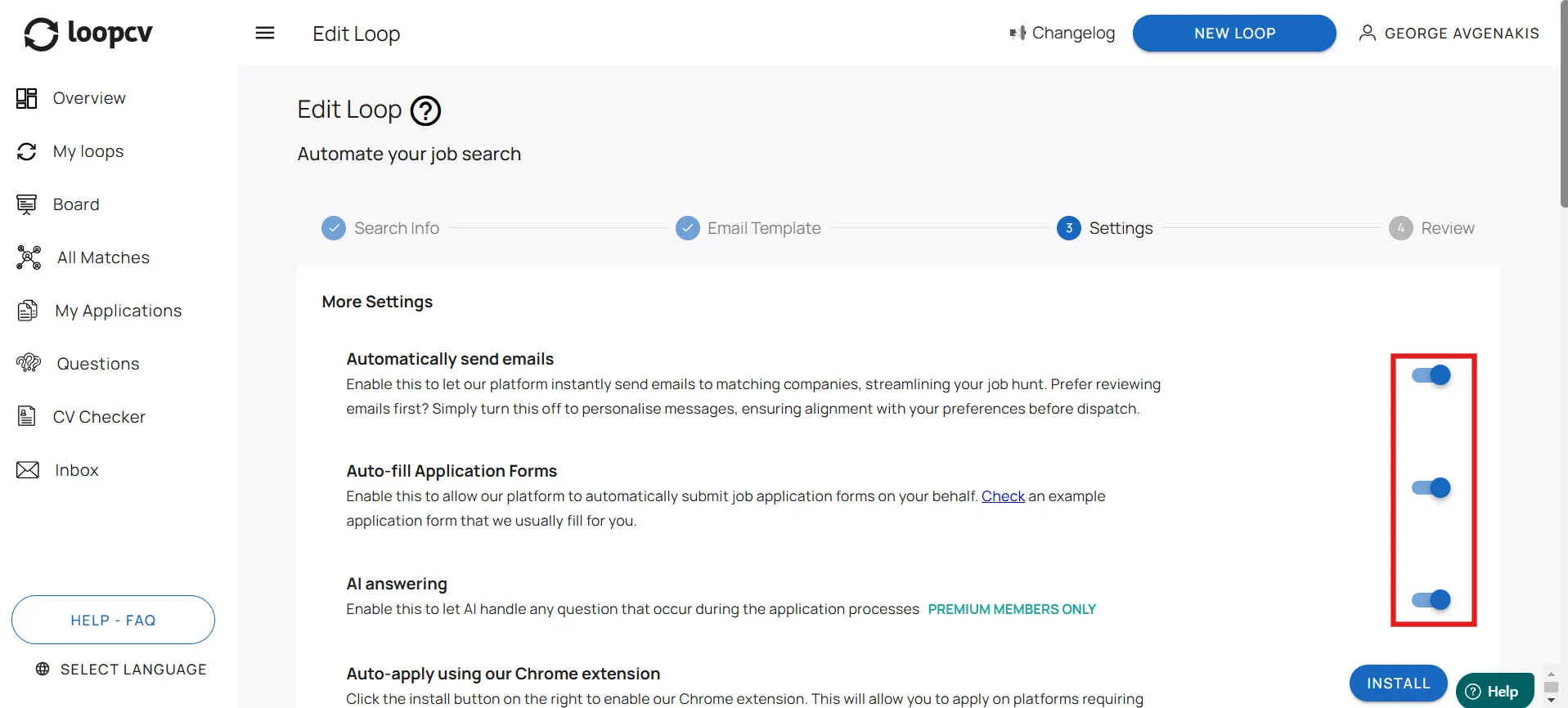
Create a Loop & Access Automations
Begin by creating a new loop in Loopcv. Follow the setup process until you reach the final step, where you can access the Automations tab. This is where you'll enable the Auto Apply feature.
Start today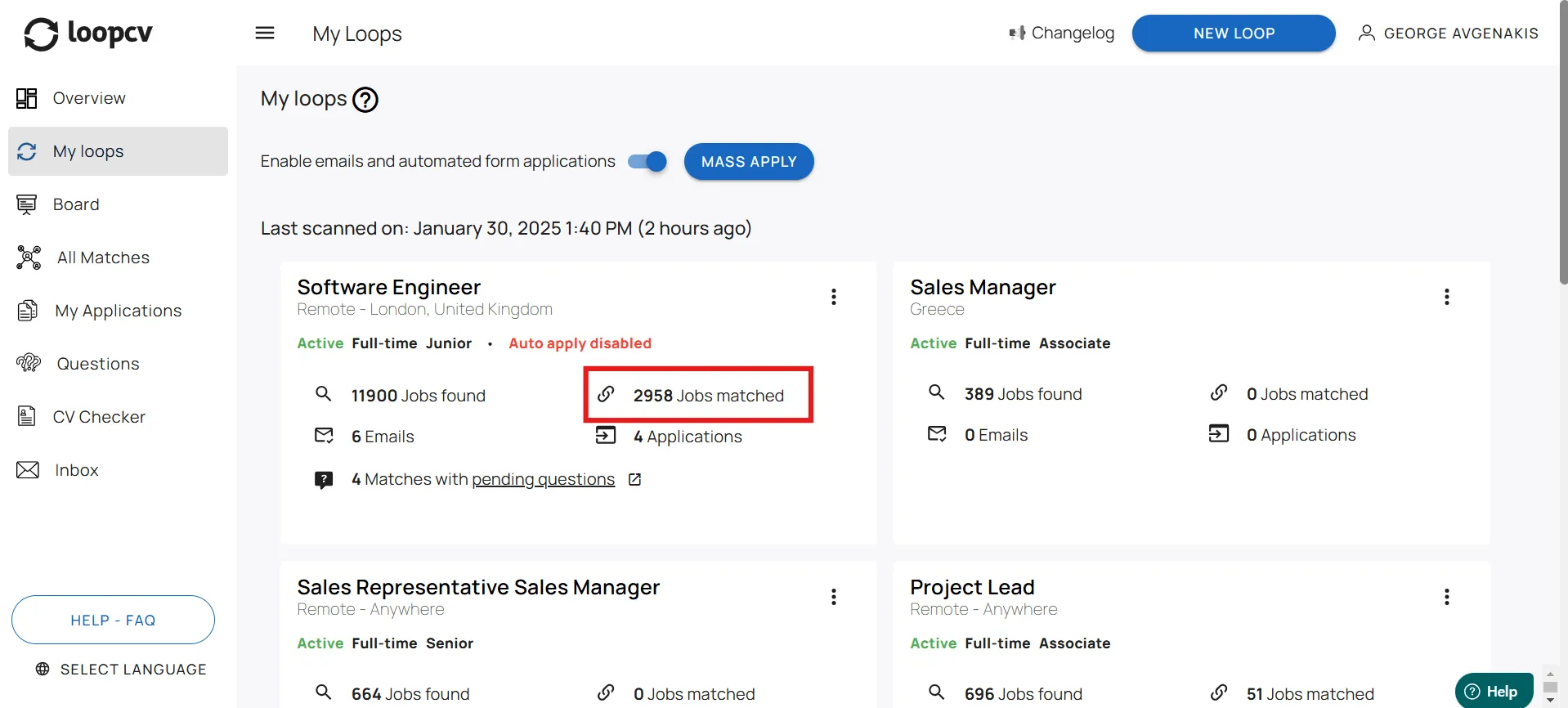
Loop Starts Finding Jobs
Once your loop is set up, Loopcv will begin searching for job listings that match your criteria. It scans multiple job boards, ensuring you get relevant opportunities tailored to your preferences.
Start today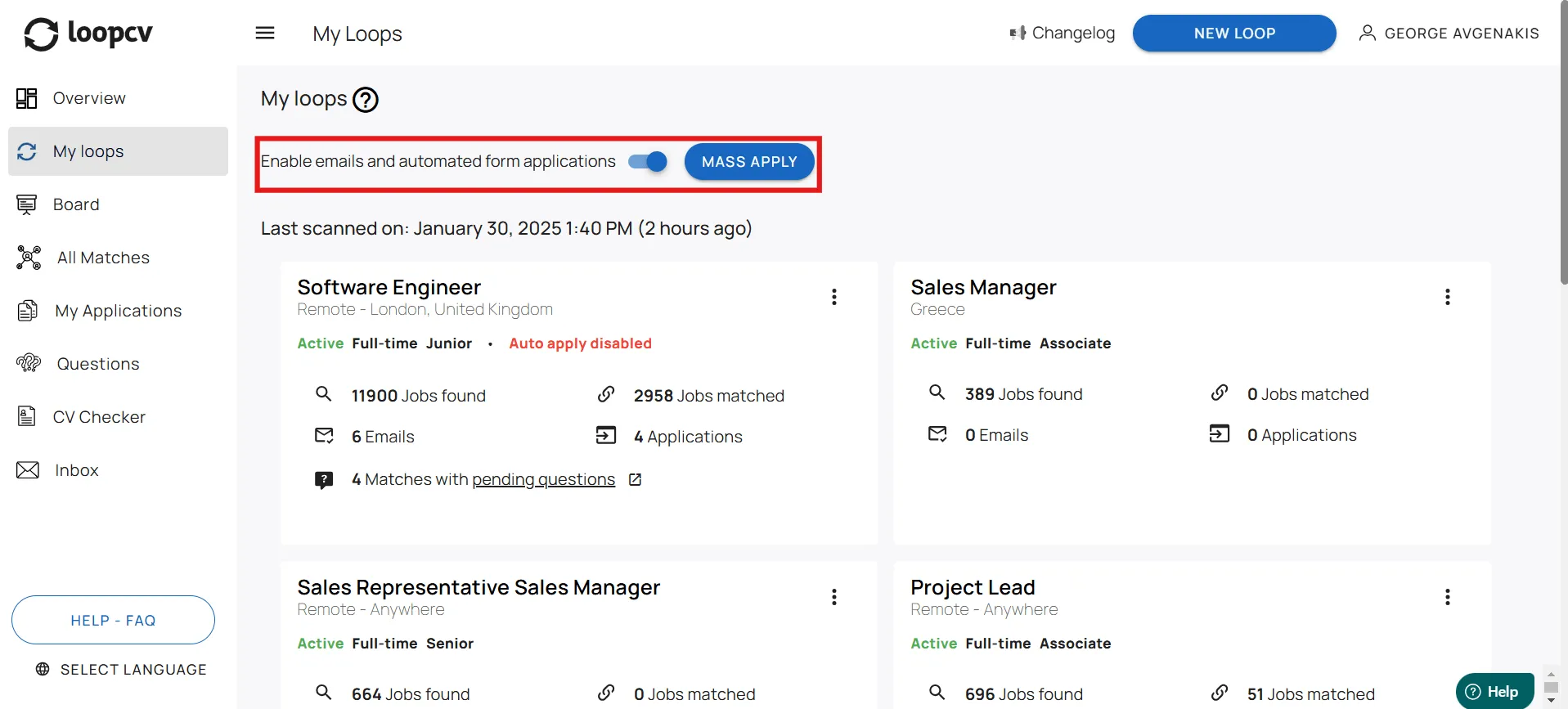
Enable Mass Apply for More Applications
To increase automation, toggle on the Mass Apply feature in Loopcv. This allows the system to send more applications automatically, boosting your chances of landing interviews faster.
Start today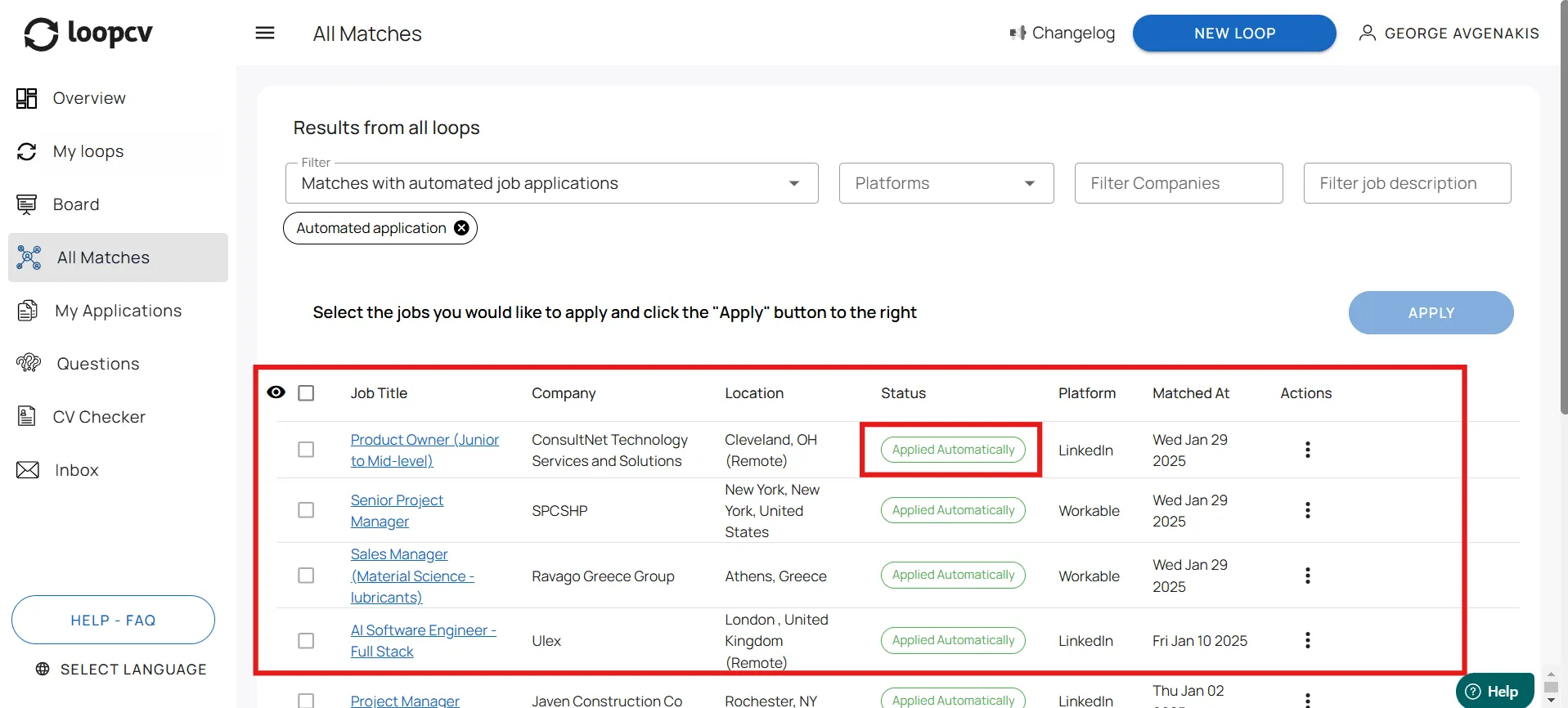
Filter & View Applied Jobs
Head to the 'All Matches' section, apply the right filters, and see the jobs where Loopcv has automatically applied. This lets you track your applications and stay organized throughout your job search.
Start todayAuto-Apply FAQs
Answers to common questions about LoopCV Auto-Apply. .
What is the Auto-Apply feature and how does it work?
The Auto-Apply feature allows LoopCV to automatically submit job applications on your behalf for matches found through your job searches. LoopCV continuously scans job boards based on the criteria defined in your job search, such as job titles, location, keywords, seniority level, and work type. When a relevant job listing is found that supports an application process that can be completed automatically, and Auto-Apply is enabled for that job search, LoopCV can proceed with submitting the application using the information stored in your profile.
Where can I enable or disable Auto-Apply for a job search?
Auto-Apply can be configured directly within each job search. When creating or editing a job search, you can choose whether LoopCV should automatically submit applications for the matches it finds or simply collect them for your review. This setting allows you to control how applications are handled for each job search individually.
Can I disable automatic applications if I don’t want them to be sent?
Yes. You can disable Auto-Apply at any time. When Auto-Apply is turned off, LoopCV will continue scanning job boards and collecting relevant matches for your job searches, but applications will not be submitted automatically. Instead, you can review the matches and choose to apply to them on demand directly from your dashboard. There is also a Master Auto-Apply option, which can disable automatic applications across all job searches at once.
Can different job searches have different Auto-Apply settings?
Yes. Each job search has its own automation settings. This means you can enable Auto-Apply for some job searches while keeping it disabled for others, depending on how you prefer to manage those opportunities.
How do automated emails work when Auto-Apply is enabled?
LoopCV can also send automated outreach emails to employers when contact information is available. When the “Automatically send emails” option is enabled in the job search settings, LoopCV can send outreach emails using the email template configured in your account, including your CV and a short introduction. This allows you to reach out to employers even in cases where the application process cannot be completed through a form.
What happens if I run out of application credits?
Each plan includes a monthly number of application and email credits. If you reach this limit, LoopCV will temporarily pause sending new applications or automated emails. You can purchase additional application or email credit packages to continue using the automation features before your credits renew. To arrange extra credits, please contact our support team at support@loopcv.com, and we will be happy to assist you.
Do I need to keep my computer on for Auto-Apply to work?
No. LoopCV runs its job scanning and automation processes on its servers. This means your job searches can continue scanning for matches and submitting applications automatically even when your computer is turned off or you are not logged in.
What happens if a job requires additional questions or manual steps during the application process?
If a job listing includes additional application questions, they are collected and displayed in the Questions tab of your dashboard. You can answer these questions once, and LoopCV will use your responses to continue the application process whenever possible. For Premium plans, the AI Answering feature can automatically generate responses to these questions and help move the application forward.
Which job boards does LoopCV auto-apply to?
LoopCV auto-applies to jobs across multiple major job boards including LinkedIn, Indeed, Glassdoor, and many others. The platform continuously expands its supported integrations to maximise your reach.
Is auto-applying to jobs safe for my professional reputation?
Yes. Applications are sent under your name with your CV and personalised details. There is no mention of automation in the application itself. We recommend reviewing your job preferences carefully so that only relevant positions receive applications.
How many jobs can LoopCV apply to per day?
The number of daily applications depends on your plan. Free users receive a limited number of applications per month, while Pro and Premium plans unlock significantly higher volumes. You can also purchase additional application credits if needed.
Can I review applications before they are sent?
Yes. If you prefer not to use full automation, you can disable Auto-Apply and use the One-Click Apply feature instead. This lets you review each matched job and apply with a single click — giving you full control while still saving time.
Does LoopCV customise the application for each job?
LoopCV uses the CV and personal details stored in your profile for every application. On Premium plans, the AI Answering feature can also generate tailored responses to job-specific questions, improving the relevance of each application.
What does AI auto-apply to jobs mean?
AI auto-apply means that an artificial intelligence tool — like LoopCV — automatically identifies and applies to job listings on your behalf, without you having to search manually or fill in application forms. LoopCV scans 30+ job boards daily, matches open roles to your CV and preferences, and submits your application automatically — including your CV and personal details — to every relevant position it finds.
How does AI apply for jobs automatically?
AI applies for jobs automatically by: (1) continuously scanning job boards for new listings that match your preferences, (2) comparing each listing against your CV, target role, location, and filters, and (3) submitting your application — including your CV and details — to every match it identifies. With LoopCV, this runs on its servers every day, so your applications accumulate even when you are not online.
Which AI automatically applies to jobs on LinkedIn?
LoopCV automatically applies to jobs on LinkedIn as part of its multi-board auto-apply system. When you set up a job search on LoopCV, it scans LinkedIn along with Indeed, Glassdoor, and 30+ other job boards — and submits applications to matching roles automatically. This means you can auto-apply to LinkedIn jobs without manually searching or submitting each application.
Can AI apply for jobs for me without me doing anything?
Yes. Once you upload your CV and set your job preferences on LoopCV, the AI runs independently — scanning job boards, identifying matching roles, and submitting applications on your behalf every day. You do not need to be logged in or have your computer running. The only setup required is uploading your CV and defining your target role, location, and any filters — after that, LoopCV applies automatically.
How do I set up AI to automatically apply for jobs every day?
To set up AI to automatically apply for jobs every day with LoopCV: (1) Create a free account and upload your CV. (2) Create a job search — specify your target job title, location, salary expectations, and any keywords or filters. (3) Enable Auto-Apply in your job search settings. LoopCV's AI then runs on its servers and applies to new matching roles every day — across LinkedIn, Indeed, Glassdoor, and 30+ other job boards — without any further action from you.